A few days back, Google engineer Steve Yegge
wrote a classic tirade about Google's inept handling of the Google+ platform.
(You can read it all here). Google+ was supposed to be a Facebook killer, but slowly it is turning to be
another Google Wave/Buzz.
One of the most interesting things pointed out in the blogpost was “The Golden
Rule of platforms is that you Eat Your Own Dogfood”.
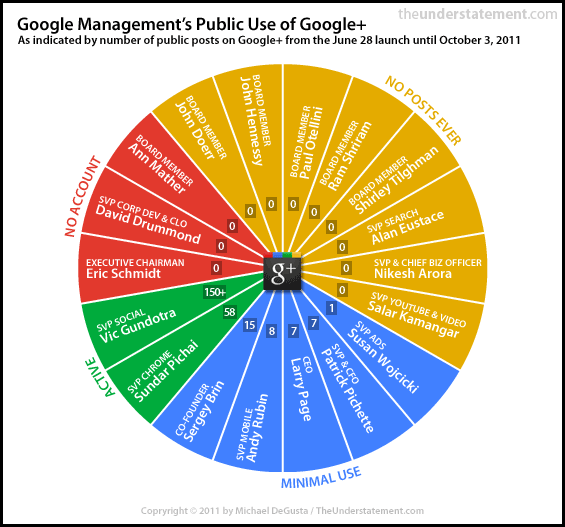
The fact that Google doesn’t even eat its own dog food is very evident in this
post from a few days back.
A few days back, Google engineer Steve Yegge
wrote a classic tirade about Google's inept handling of the Google+ platform.
(You can read it all here). Google+ was supposed to be a Facebook killer, but slowly it is turning to be
another Google Wave/Buzz.
One of the most interesting things pointed out in the blogpost was “The Golden
Rule of platforms is that you Eat Your Own Dogfood”.
The fact that Google doesn’t even eat its own dog food is very evident in this
post from a few days back.
 As I read this post, I realized how many times
we have implemented PLM at various sites and, what the end result has been - all
along we have known for a fact that the one of the key measure of a winning and
thriving PLM implementation was effective user adoption. And this not mere consultant
conjecture, this has been validated by research too - According to a
study
done by the Sand Hill Group and Neochange, the most critical factor (70%
listed as number 1) for software success and return-on-investment is effective
user adoption. Software functionality came in at 1% surprisingly, with
organization change at 16% and process alignment at 13%.
No wonder Google+ has been a nonstarter (Paul Tassi has even written “A Eulogy for Google Plus”)
As I read this post, I realized how many times
we have implemented PLM at various sites and, what the end result has been - all
along we have known for a fact that the one of the key measure of a winning and
thriving PLM implementation was effective user adoption. And this not mere consultant
conjecture, this has been validated by research too - According to a
study
done by the Sand Hill Group and Neochange, the most critical factor (70%
listed as number 1) for software success and return-on-investment is effective
user adoption. Software functionality came in at 1% surprisingly, with
organization change at 16% and process alignment at 13%.
No wonder Google+ has been a nonstarter (Paul Tassi has even written “A Eulogy for Google Plus”)
So what can we learn about
Google+ hopeless case and how it relates to a successful PLM implementation
from a user adoption standpoint? Several I would say:

1. Not Enough Power Users
(or Management Support or Practice what you preach): Google's Schmidt finally took
to Google+ only a couple of days back.
Most members of the company's management team aren't still using Google+.
Likewise if your PLM implementation has to be successful the concerned top
level management has to use it. No point if the VP or Director of Engg/Rnd
still uses emails to approve designs or wants printed copies or whatever
completely bypassing the system.
2. Have Real Value for the End
User: If the current PLM system is just a replacement for the old one with lots
of cute UI’s and bells and whistle – quite likely the reaction is going to be
the same as was with the old one once the initial hype cycle dies down.
3. Launch when ready: Most
people would advocate implementing PLM in phases. Good point. But just because
you have to close out one phase to start another doesn’t mean you need to roll
out a half baked product/service to the user community.
4. Vendor Size Doesn’t
Matter: Even with an 800 pound gorilla’s backing, Buzz, Wave and now + failed.
Likewise even if the vendor is large or their PLM system caters to the biggest
of the big Fortune 500 companies, it’s not necessary that it will cater to all
your user needs. Give your users what they want to be successful in getting
their job done. Don’t focus almost exclusively on tiny little features that few
people will ever use.
5. Customize if needed: Oh yeah, that’s
a bad word – We don’t want to customize and keep on paying for the maintenance!
Right – But what is the point in using terminology or vendor mandated business
processes which the user community doesn’t understand? I still don’t get
circles, stream, hangouts or whatever.

6. Motivate People to Use it: People
simply didn’t move in droves from Facebook to Google+ as was expected. There
was no motivation to do so. FB was sufficient to satisfy the needs of most of
the users. Just because something is mandated by the organization doesn’t mean
that the users will use it or be happy to use it (sometimes you don’t have a
choice – like using LotusNotes or HP’s Quality Center for example!). Motivate
the end users to use the new PLM system – Have a plan much before go-live!
7. Integration: Well
Google+ has probably integration with lots of websites and stuff, but Facebook
is better! Host of games and apps and I can even sign into/comment on a bunch
of websites using my Facebook id. Similarly if the PLM system doesn’t have
integration to systems like corporate LDAP, or the SMTP server or inaccessible
externally users would have tough time getting on-boarded.
Probably I can go on and on but
I hope readers get the point! Don’t take user adoption unconscientiously – it’s
the key to a triumphant implementation. (I wouldn’t underestimate Google though
– Maybe this time they will get it right – eventually)